The best citation management software for most single-office dental practices is BrightLocal. Its Citation Builder charges $3.20 per directory, and its free plan gives you access to it. So a practice can fix 40 listings for $128 and pay nothing each month. Groups with many offices should look at Yext, which syncs provider profiles to more than 200 publishers and healthcare directories.
We compiled this list from each vendor’s own pricing and help pages. Then we checked which health directories each tool can reach, because that is where dental listings differ from a pizza shop’s. Finally, we ran the first-year cost for one office and for an eight-office group.
Request Dental SEO Quote
What We Found Across Five Citation Tools
- BrightLocal is the lowest-cost route for one office: $3.20 a site, $30 per data aggregator and no required plan.
- Yext reaches WebMD Care and Vitals for healthcare professionals and quotes prices through its sales team.
- Semrush Local Pro costs $60 a month per location on annual billing and adds WebMD, Vitals and Wellness.com for US healthcare categories.
- Whitespark sells one-time citation packages priced between $20 and $999, plus a citation finder for research.
- Advice Local runs a healthcare add-on that covers Healthgrades, RateMDs, DocSpot and eHealthScores.
- No tool claims a Healthgrades profile, an ADA Find-a-Dentist listing or an insurance directory for you. Those stay manual.
Why Dental Listings Need More Than a General Citation Tool
A dental office lives on two kinds of directories. First come the general ones, such as Google, Apple Maps, Bing, Yelp and Facebook. Then come health sites, where patients compare dentists by insurance, reviews and specialty.
Most citation tools handle the first group well. The second group is harder. Healthgrades, for instance, often holds a profile for each dentist before anyone claims it, and a claim needs a state license number. WebMD Care offers a free basic profile that shows on WebMD and Vitals. As a result, the tool you pick should push to those health sites or leave you a clear list to do by hand.
Also, our list of 100 places to list a dental website covers the directories one by one. This page covers the software that fills them in and keeps them right.

Price and Health Directory Reach for Each Tool
We put the numbers side by side so you can compare them in one pass. Prices are in US dollars and come from each vendor’s pricing page.
| Tool | How you pay | Starting price | Health directories it names | Best match |
|---|---|---|---|---|
| BrightLocal | Pay per site, optional plan | $3.20 per site; free Simply Listings plan | Niche sites in 40+ industries; publishes a dentist citation list | Single offices that want low cost |
| Yext | Annual contract through sales | Quote from Yext sales | WebMD Care and Vitals; 200+ publishers and healthcare directories | Groups and DSOs with many providers |
| Semrush Local | Per location, billed annually | $30 Base, $60 Pro (listings on Pro) | WebMD, Vitals and Wellness.com for US healthcare categories | Practices already using Semrush |
| Whitespark | One-time packages | Packages priced between $20 and $999 | Not named on its pricing page | Offices that want staff to do the submissions |
| Advice Local | Plan plus healthcare add-on | Listed on its pricing page | Healthgrades, eHealthScores, DocSpot and RateMDs | Practices that want health sites covered |
The Five Citation Management Tools We Recommend for Dentists
We ranked these tools on three things. First, the cost for one dental office. Second, how many health directories they reach. Third, how much control the practice keeps over its own listings.
1. BrightLocal Charges Per Site and Keeps Your Logins
BrightLocal is our pick for a single dental office. Its Simply Listings plan is free and opens Citation Builder, a pay-as-you-go service. Each site costs $3.20, or $2 per credit if you buy a bulk pack of 500, 1,000 or 2,000 credits.
People do the work by hand. BrightLocal says its specialists submit your details within 7 days, and listings usually go live in 7 to 14 days. Some sites take up to six weeks. Also, the service removes duplicates, fixes wrong details and hands you the login for every listing it builds. That last point matters for a dental office, because the practice keeps control if it changes agencies.
Data aggregators cost $30 each across five networks, or $120 a year to renew all five. Then, if you want listings guarded against third-party edits, Active Sync runs $50 a year per location for Essential. The Plus tier costs $70 a year and works only in the US and Canada.
BrightLocal also publishes a list of 50 citation sites for dentists. It includes Zocdoc, Vitals, RateMDs, Wellness and Doctor.com. However, BrightLocal notes that the list is not the same as the sites its Citation Builder can submit to. So ask which health sites are in your order before you pay.
The monthly plans are optional, though. For one location, Track costs $41 a month, Manage $54 and Grow $65 on monthly billing. Annual billing brings them down to $31, $40 and $49 a month. Manage adds listing sync, and Grow adds review management.
BrightLocal could add a clearer list of dental and health directories inside Citation Builder. Even so, its per-site pricing keeps a small office’s first year low.
2. Yext Syncs Provider Profiles for Multi-Office Groups
Yext is built for groups that manage many providers. Its healthcare page says it keeps provider profiles consistent across 200+ publishers and healthcare directories. For example, its WebMD integration lists Listings Sync, Review Monitoring and Review Response for the Healthcare Professional entity type.

That entity type matters for dental groups. Each dentist can have a profile apart from the office, and Yext treats providers as their own records. Also, WebMD updates from Yext run daily for US profiles, and they cover WebMD Care and Vitals.
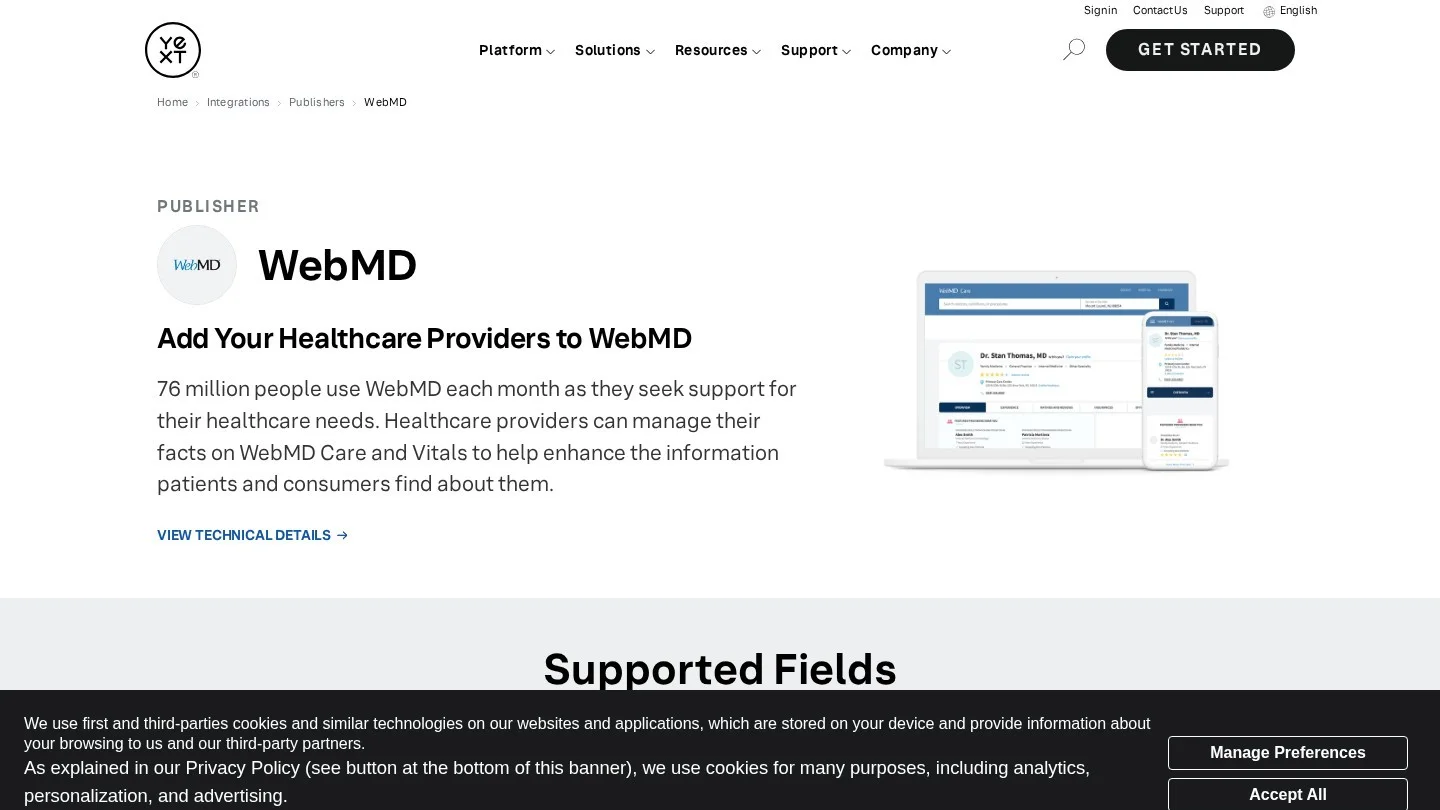
Yext does not post prices on its healthcare page. Instead, it routes buyers to a demo and its sales team. So a two-chair office will find it more than it needs. On the other hand, a DSO with 30 dentists gets one dashboard for every provider and office.
Yext’s healthcare page lists a question on HIPAA-safe review management at scale. Still, treat review replies with care whatever tool you use. In 2019, a Dallas dental practice paid $10,000 to settle potential HIPAA violations over details it shared in Yelp replies. A reply should never confirm that the reviewer is a patient.
3. Semrush Local Pro Adds WebMD, Vitals and Wellness.com
Semrush Local comes in two self-serve tiers, so a practice can buy it without a sales call. Base costs $30 a month per location, and Pro costs $60, on annual billing. Listing Management sits on Pro only.
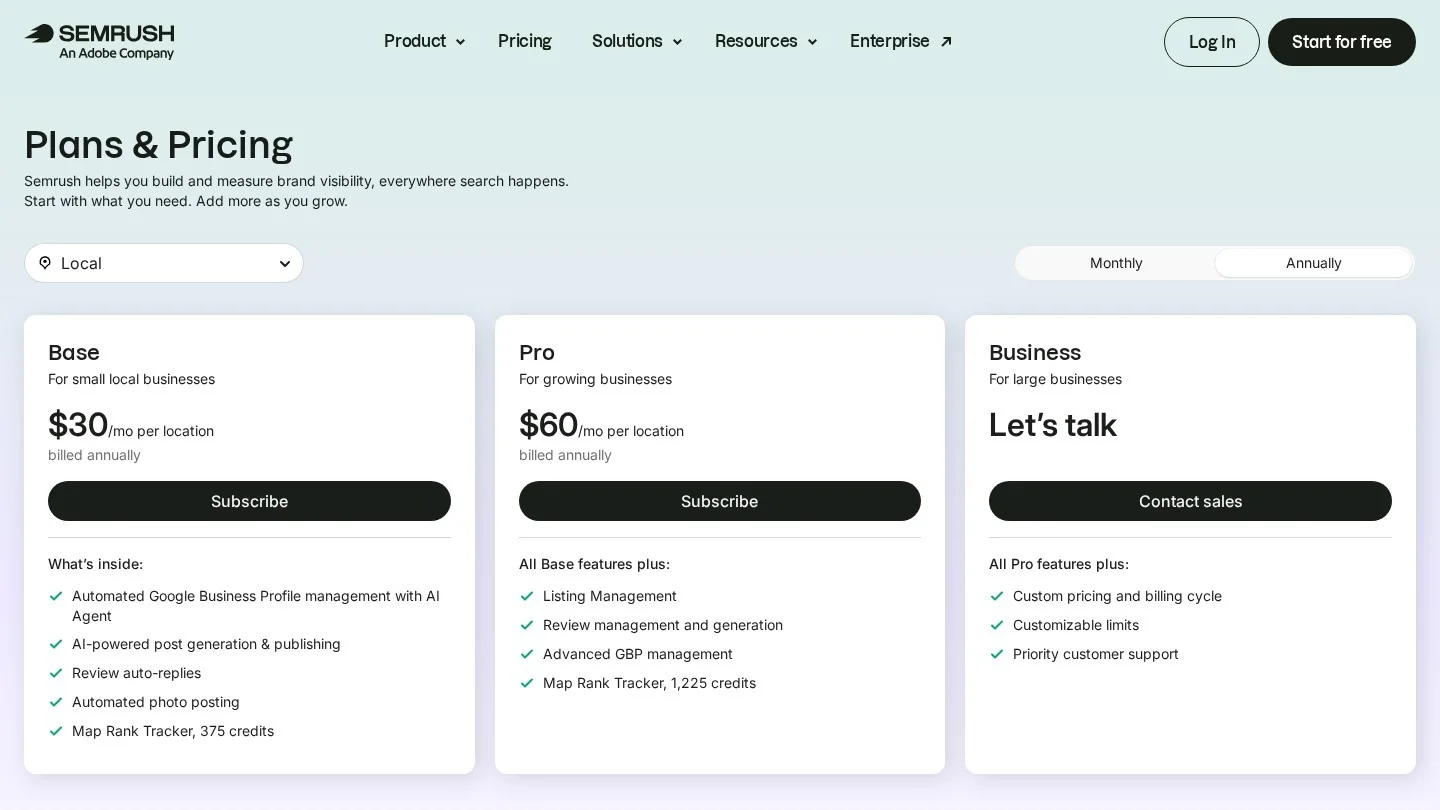
Semrush says Listing Management shares your details across 70+ directories. Its help center lists 66 of them for the US, including Apple, Bing, Nextdoor, Foursquare and OpenAI. In fact, health sites are added on top for US locations with a healthcare category. Semrush names WebMD, Vitals and Wellness.com as examples.
So a dental practice already paying for Semrush can add citation work without a new vendor. Still, $720 a year per office adds up fast for a group. Semrush could publish the full healthcare directory list on the same help page, which would let practices compare it with Yext line by line.
4. Whitespark Does the Submissions by Hand
Whitespark sells its Listings Service as one-time packages priced between $20 and $999. There is no monthly fee for the building itself. That model works for a practice that wants the job done once and then checked each quarter.

Whitespark also sells Local Citation Finder, with plans priced between $33 and $149 a month. It finds where your competitors are listed and where you are missing. For example, if three nearby orthodontists all appear on the same specialty directory, the gap shows up in the report.
Whitespark’s pricing page does not name health directories. As a result, send them your own list, such as Healthgrades, WebMD Care and your specialty academy, and ask which ones the package covers.
5. Advice Local Covers Health Directories as an Add-On
Advice Local runs a product it calls Local Verticals for Healthcare. It lists Healthgrades, eHealthScores, DocSpot and RateMDs among the health sites it covers. That reach is useful for a dental office, because general tools often skip those sites.

Advice Local publishes plan prices on its own pricing page, so compare them with BrightLocal’s per-site cost for your office count. Advice Local could also list dental-only directories, which would make the add-on clearer for dentists.
What One Office and an Eight-Office Group Pay in Year One
We ran the first-year math with Python using the prices above. Our assumption is 40 directories per office, five data aggregators and Active Sync Essential on every location.
| Cost line | One office | Eight offices |
|---|---|---|
| BrightLocal Citation Builder, 40 sites per office at $3.20 | $128 | $1,024 |
| BrightLocal aggregators, five at $30 per office | $150 | $1,200 |
| BrightLocal Active Sync Essential, $50 per office | $50 | $400 |
| BrightLocal first-year total | $328 | $2,624 |
| Semrush Local Pro, $60 a month per office | $720 | $5,760 |
For one office, BrightLocal costs less than half of Semrush Local Pro in year one. For eight offices, the gap grows past $3,000. However, the comparison is not exact. Semrush Pro also includes other local tools, while BrightLocal’s total covers listings only. Yext belongs in the same comparison for a group, but you will need its quote to run the numbers.
A group could also buy a 500-credit BrightLocal pack at $2 a credit. That is $1,000 for 320 builds, which leaves 180 credits for later updates.
Dental Directories No Software Fills In for You
Some of the most useful dental listings need a person at the practice. First, Healthgrades asks for a state license number when you claim a dentist’s profile. Then it reviews the claim before it goes live.
Second, WebMD Care gives each provider a free basic profile that appears on WebMD and Vitals. Claim it even if your tool also pushes data there, because the claim gives you edit rights.
Third, ADA Find-a-Dentist lists ADA member dentists only. Members must tick “Include in Find-a-Dentist” in the My ADA portal. Fourth, insurance directories such as Delta Dental list you through credentialing, so keep your address and new-patient status current with every network.
| Directory | Who handles it | What the practice needs |
|---|---|---|
| Google Business Profile | You, then sync tools read it | Verified owner access |
| Apple Business Connect | You | Apple business verification |
| Healthgrades | You | State license number for each dentist |
| WebMD Care and Vitals | You, then Yext or Semrush can sync | A claimed provider profile |
| ADA Find-a-Dentist | The member dentist | ADA membership and the include box ticked |
| Insurance network directories | Your credentialing contact | Current details with each payer |
| General directories and aggregators | Your citation tool | One master record of name, address and phone |
Your Google profile still carries the most weight for the map pack. So finish it before you run any tool, and our guide to the dental local 3-pack shows the fields that count.
Set the Right Category Before a Tool Copies It Everywhere
A citation tool copies your categories to every site it touches. So a wrong category spreads fast. Under Section 5.H of the ADA Code, a dentist may announce as a specialist only in a recognized specialty. Then Section 5.I asks general dentists who announce services to avoid implying a specialty.
Because of that, a general dentist who places implants should not be listed as an oral surgeon or periodontist. Instead, pick “Dentist” as the primary category, and add services in the description instead. Also, check your state board’s advertising rules before you add any specialist label.
Your website should match the master record too. For instance, the name, address and phone in your Dentist schema markup should be the same as the record you load into the tool.
Audit What the Tool Built Every Quarter
A citation tool reports what it sent. However, it cannot always see what a directory changed later. So book one hour each quarter to check the listings yourself.
- Search Google for your old phone number in quotes. Any page that still shows it needs a fix.
- Search for the practice name plus a former address, if you have moved in the last few years.
- Open your top ten listings and compare each field with the master record, including suite numbers.
- Look for duplicates, such as one listing under the practice name and another under a dentist’s name.
- Check that each dentist’s health profiles show the right office, insurance plans and new-patient status.
- Log every fix in a sheet with the date, the site and the field you changed.
Duplicates cause the most trouble for dental offices. For instance, a retired dentist’s old listing can keep sending calls to a number that no longer works. In that case, ask the directory to mark the listing closed or merge it, and keep the ticket number in your sheet.
Also, recheck after any change at the practice. A new phone system, a new suite number or a new associate dentist each means one more round of updates. Our dental website audit tools list covers tools that also check the website side.
Pick a Tool by Practice Size and Setup
The right tool depends on how many offices and providers you manage. So use this table to narrow it to one or two.
| Your situation | Our pick | Why |
|---|---|---|
| One office, tight budget | BrightLocal Citation Builder on the free plan | Lowest year-one cost and you keep the logins |
| One office, already on Semrush | Semrush Local Pro | WebMD, Vitals and Wellness.com in the same account |
| Two to ten offices | BrightLocal with bulk credits, or Semrush Local Pro | Predictable cost per office |
| DSO or group with many providers | Yext | Provider-level profiles and daily WebMD sync |
| Wants staff to do it once | Whitespark Listings Service | One-time packages with no monthly fee |
| Specialty office that needs health sites | Advice Local with the healthcare add-on | Covers Healthgrades, RateMDs and DocSpot |
Groups have extra problems, such as one phone number for several offices. Our guide to multi-location dental SEO covers those. Also, see our list of SEO tools for dentists if you want rank tracking in the same tool.
Answers on Dental Citation Software
Do Listings Disappear If We Cancel a Citation Tool?
It depends on how the tool works. Built citations, like BrightLocal’s, are real listings, and you keep the logins. Synced listings depend on the vendor’s terms, so ask what happens to each listing before you sign.
Can We Manage Citations Without Paid Software?
Yes. Google Business Profile, Apple Business Connect and Bing Places are free. Data Axle also lists a free plan for one to ten listings. The work just takes more staff time, and someone has to check the listings each quarter.
Do Health Sites Need a Profile for Every Dentist?
On health sites such as Healthgrades and WebMD Care, yes, because patients search by dentist name. On Google, a dentist who sees patients at the verified office can have a profile with their own name. Hygienists and front-desk staff cannot.
Do Citations Help in AI Search Answers?
Yes. AI answers about local dentists draw on the same public business data that directories hold. So matching details across trusted sites is part of AI SEO for dentists.
Can a Citation Tool Handle Our Reviews Too?
Several can. BrightLocal’s Grow plan, Yext and Semrush Local all include review features. Still, any reply must protect patient privacy. Our guide to getting more five-star dental reviews covers safe wording.
Clean Up Dental Listings Over Four Weeks
In week one, write one master record with the name, address, phone, hours and website. Then fix Google, Apple and Bing by hand. In week two, buy your citation package or plan, and load the master record.
Next, in week three, claim Healthgrades, WebMD Care and your ADA or specialty listing. Finally, in week four, check the tool’s report for duplicates and old phone numbers. Practices that want a firm to handle it can compare specialists on Dental SEO Agencies.