
The fastest way to get more five-star reviews for a dental clinic is to ask every patient. Send the request the same day, with a direct Google review link. Keep the request short, and use a link that opens the review box in one tap. So the job is mostly about routine, and very little about persuasion.
However, three sets of rules shape how you ask. Google bans review incentives and asking only happy patients. The FTC’s fake reviews rule adds federal penalties for buying or suppressing reviews. And HIPAA limits what a dental office can say in a reply.
We compiled those rules from Google’s own policy pages, the FTC rule and HHS enforcement cases. Then we wrote our own request scripts and reply templates, and we looked at how real practices present reviews on their sites.
Request Dental SEO Quote
Follow Five Rules for a Review Program That Stays Within Policy
- Send the same review request to every patient after every completed visit. Google bans asking only the patients you expect to be happy.
- Give no discount, raffle entry or gift for a review, because Google removes incentivized reviews and can suspend accounts.
- Drop staff review quotas and requests that ask patients to name a team member, since Google’s policy now bans both.
- Never confirm in a reply that the reviewer is a patient. Dental offices have paid $10,000 and $23,000 to settle HIPAA cases over review replies.
- Track rating, review count, days since the newest review and reply time every month.
Ask Every Patient After Every Completed Visit
Google’s Maps content policy says a business may not “selectively solicit positive reviews from customers.” It also bans discouraging negative reviews. So any process that screens patients first, and sends only the happy ones to Google, breaks the policy.
Asking everyone also works in your favor. Google’s own help page says that a mix of positive and negative feedback often feels more trustworthy to readers. In fact, we would trust a profile with 300 reviews and a 4.7 rating over one with 40 reviews and a perfect 5.0.
Pick one trigger and use it for every patient. For most offices, that trigger is a completed appointment in the practice management system. Then the request goes out automatically, so nobody at the front desk decides who gets one.
Also, our dental Google reviews statistics show how patients read ratings, review counts and review dates. Those numbers explain why a steady flow beats a big push once a year.

Create Your Google Review Link and QR Code
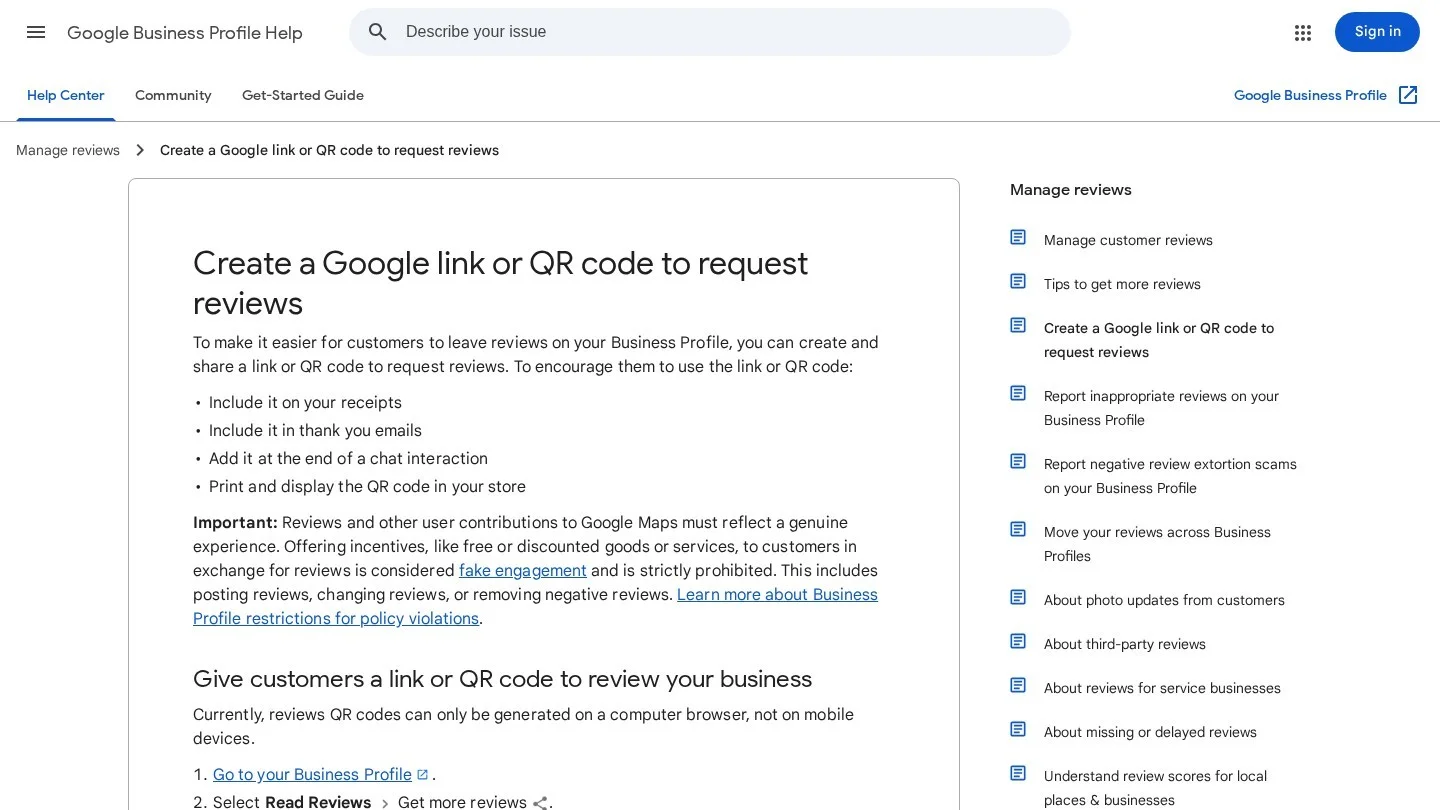
Google gives every Business Profile a review link and a QR code. First, sign in to your Business Profile on a computer, because the QR code option does not appear on mobile. Next, click Read reviews, then Get more reviews. Finally, copy the link or right-click the QR code and save the image.
Keep both in one shared place, such as the office’s marketing folder. Also, load the link into your reminder or texting software as a saved template, so every team member sends the same link.
Google lists several places to share it. These include receipts, thank-you emails and a printed display at the counter. In addition, patients must be signed in to a Google account to leave a review. So the request should say “it opens Google” and nothing more complex.
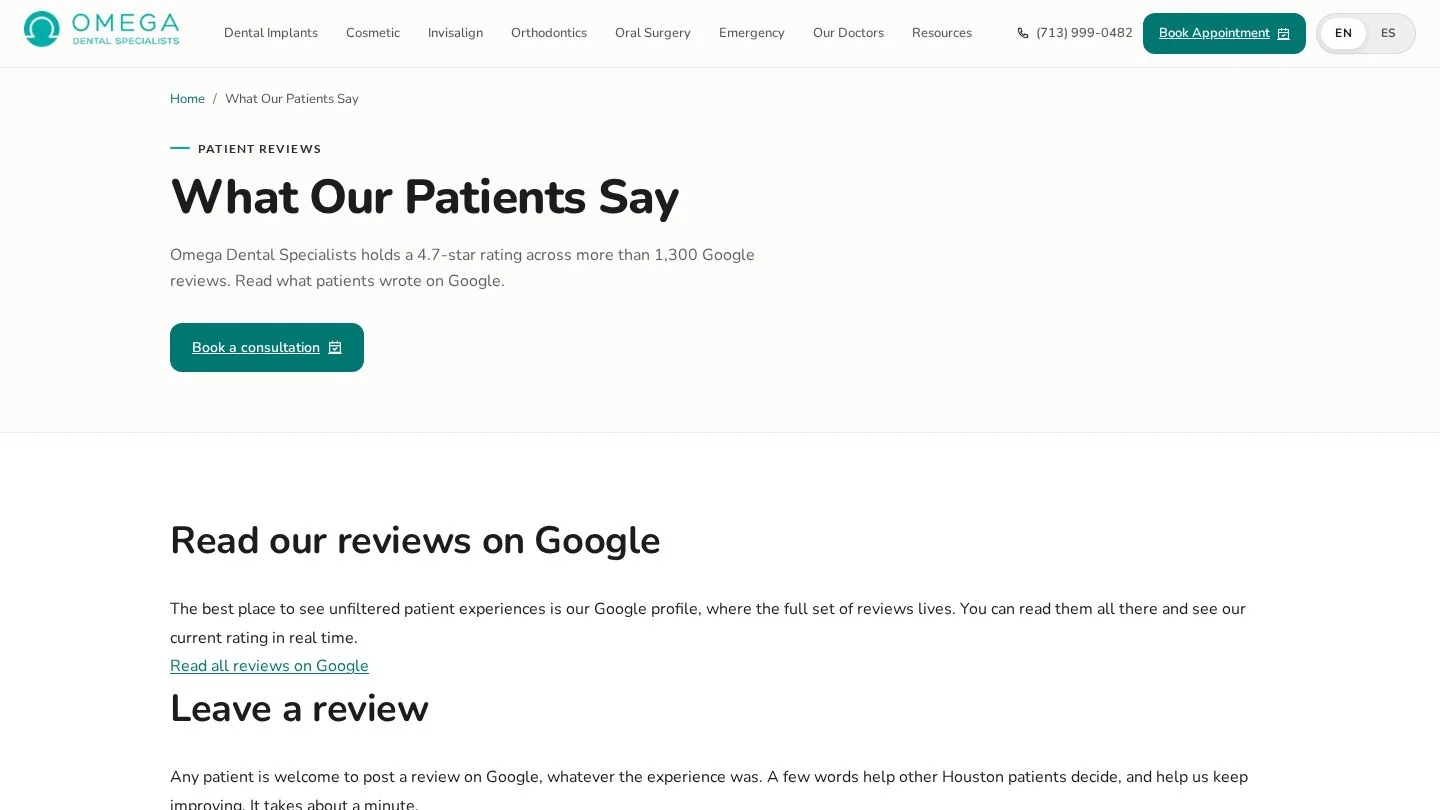
Your own website is one more place for the link. For example, Omega Dental Specialists in Houston has a “Leave a Google review” button on its reviews page. A second button reads “Read all reviews on Google.” It also states the practice’s 4.7-star rating from more than 1,300 Google reviews.
Rockville Dental Arts in Maryland does the same on its reviews page. A “Click here to post review on Google” button sits on the page, next to a feed of recent Google reviews from patients.

Multi-office groups, however, need one link per office. A patient seen in your north office should review the north office profile. Our guide to multi-location dental SEO covers how to keep each office’s profile separate.
Park Dental, a group with offices across Minnesota and nearby states, uses a location menu on its leave a review page. Patients first choose their office from about 60 options. Then they click “Write a Review” for that office.
Send Review Requests Patients Actually Answer
We wrote these scripts for dental offices. They name the practice, give one link and ask for a fair review. Also, none of them mentions stars, a staff member or a reward.
Text the Link Within Two Hours of Checkout
A text sent the same afternoon reaches the patient while the visit is still fresh. Keep it under 160 characters, so it fits in one standard text message. For example:
- “Thanks for visiting Maple Street Dental today. Would you share a review of your visit on Google? [link]”
- “Hi from Maple Street Dental. We’d value your feedback on today’s visit. It takes a minute on Google: [link]”
Avoid treatment details in the text. For instance, “How did your root canal go?” puts health information in a message the patient’s family might read. So keep the wording general.
Follow Up Once by Email Three Days Later
Send one reminder by email to patients who have not reviewed yet. Then stop. More than one reminder starts to feel like pressure.
- Subject line: “A quick favor from Maple Street Dental”
- Body: “Thank you for choosing us for your recent visit. Reviews help other families in our area pick a dentist. If you have a minute, please share your experience on Google: [link]. Thank you, the Maple Street Dental team”
Ask Once at the Front Desk, Then Hand Over a Card
A spoken request still works, because the patient hears it from a person. So at checkout, the front desk can say, “We’d really value a Google review. There’s a QR code on this card.”
Print the QR code on a small card with the practice name. Also, put a stand-up version on the counter.
Word Requests Without Steering the Rating
Some phrases break Google’s policy without anyone noticing. For example, “If you loved your visit, please leave us five stars” asks only happy patients to review. Similarly, “Please mention Dr. Lee in your review” asks for content that names a staff member.
| Phrase to drop | Why it breaks the rules | Phrase to use |
|---|---|---|
| “If you had a five-star visit, review us” | Asks only happy patients | “Please share your experience on Google” |
| “Mention your hygienist by name” | Requests content naming staff | “Tell other patients about your visit” |
| “Review us and get $10 off whitening” | Offers an incentive | “Your feedback helps other families find us” |
| “Not happy? Call us first before posting” | Discourages negative reviews | “Questions about your visit? Call us any time” |
Remove Incentives, Filters and Staff Quotas From Your Process
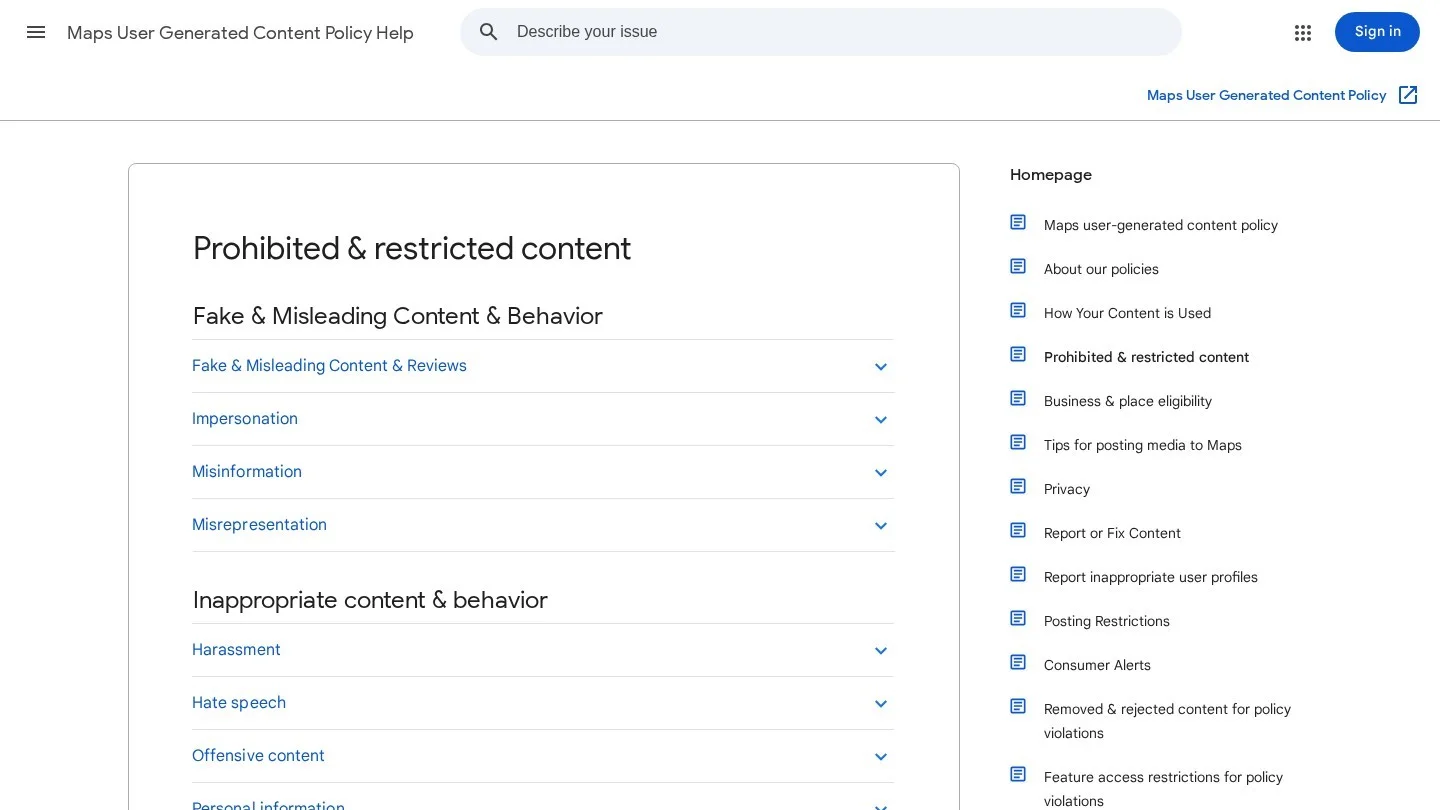
Google lists the review tactics it treats as fake engagement. Next to selective requests, it bans incentives such as payment, discounts and free services. It also bans incentives to change or remove a negative review. Google says it removes such reviews and may suspend or terminate the account behind them.
Check Your Review Software for a Satisfaction Filter
Many review tools send a short survey first. Then they route high scores to Google and low scores to a private form. That routing is review gating, and Google’s policy bans it.
So open your review software settings and look for words such as “feedback filter”, “smart routing” or “satisfaction threshold”. Then turn them off, so every patient sees the Google link. You can still send a private feedback form, but only next to the public link.
SpaDental, a UK dental group, pairs the two on its review thank-you page. Patients answer a short survey question, and the same page asks them to review their practice on Google or Facebook. It also displays a 4.8 out of 5 rating based on 11,998 reviews.

Retire Staff Contests and Name Requests
Google’s policy bans requests that staff collect a set number of reviews. It also bans asking for reviews that name a team member. As a result, a monthly prize for the hygienist with the most reviews breaks the rules.
Instead, measure the office as a whole. Track total reviews per month and share the number at the team meeting. If patients name a hygienist on their own, that is fine, because the office did not ask for it.
Keep Team Members and Their Families Off Your Profile
Google treats content based on a conflict of interest as prohibited, and that includes current or former employment. So team members should not review their own office. The FTC rule adds a federal layer, because it bans undisclosed reviews by company insiders.
Know What the FTC Fake Reviews Rule Covers
The FTC announced its final rule on consumer reviews and testimonials in August 2024, and it took effect on October 21, 2024. It bans fake reviews, including AI-written ones from people who never visited. Also, it bans buying reviews with incentives tied to a positive or negative sentiment. It bans review suppression through threats or intimidation as well.
For a dental office, two parts matter most. First, never write or buy reviews, even for a new office with no history. Second, never threaten a patient with legal action over a fair negative review. The FTC can seek civil penalties for each violation.
Yelp has its own rule. Its business support pages ask owners not to request reviews at all. In addition, Yelp can post a consumer alert on a business page when it finds incentives for reviews. So focus your requests on Google, and let Yelp reviews arrive on their own.
Reply to Every Review Without Confirming the Patient Relationship
A reply that says “we’re glad your crown fits well” confirms the reviewer is a patient and names a treatment. As a result, under HIPAA, that can be a disclosure of protected health information. Federal enforcers have acted on exactly this.
In 2019, Elite Dental Associates in Dallas paid $10,000 to the HHS Office for Civil Rights. Its Yelp replies had disclosed a patient’s last name and details of her treatment plan, insurance and cost. Then in December 2022, New Vision Dental in California paid $23,000 and accepted a two-year corrective action plan. Its replies to online reviews had disclosed patient names, treatment and insurance details. In 2023, HHS settled a similar case with Manasa Health Center, a New Jersey provider, for $30,000.
So write every reply as if a stranger will read it, because one will. Thank the reviewer, speak about the office in general and offer a phone number. Never confirm or deny that the person was a patient.
Use These HIPAA-Safe Reply Templates
We wrote these templates for dental teams. They work for any rating, because none of them confirms a visit.
- Five stars: “Thank you for taking the time to share this. Our team works hard to make every visit comfortable, and kind words like these mean a lot to us.”
- Three stars: “Thank you for the feedback. We’re always looking for ways to improve. If you’d like to talk about anything, please call our office manager at [phone].”
- One star: “We’re sorry to read this. Privacy laws keep us from discussing anyone’s care online. Please call our office manager at [phone] so we can listen and help.”
Google’s own reply tips point the same way. Keep replies short and conversational, and never share a reviewer’s private details. Google also suggests skipping identical “thank you” replies on every review. So rotate a few versions, and write fresh replies where a review raises a real issue.
Draft Replies Without Patient Details in AI Tools
Some offices draft replies in ChatGPT or similar tools. That is fine for wording, but only when no patient name or chart detail goes into the prompt. Our guide to growing a dental practice with ChatGPT covers the privacy rules for those tools.
Handle One-Star Reviews Without Making Them Worse
First, wait an hour before replying, and let the office manager write it. Then post the one-star template, with the phone number. Future patients read the reply as closely as the complaint.
Next, check whether the review breaks Google’s rules. Reviews from people who were never at the office, spam and conflicts of interest can be reported from the Business Profile. However, Google decides what comes down. A review that is simply negative and true will stay.
Finally, never threaten a reviewer or offer money to remove a review. Google bans incentives for removing negative reviews. In addition, the FTC rule bans using threats or intimidation to suppress reviews. If a review contains false claims that worry you, speak with a healthcare attorney first.
Show Patient Reviews on Your Website the Right Way
Real practices put reviews on their own sites, and the good ones keep a public Google link next to them. Yorkville Village Dental Group runs a reviews page with patient comments and a “Review on Google” button. As a result, a visitor reading reviews can add one in a single click.
Torrance Dental Spa in California shows a 5.0 rating from 131 Google reviews on its patient reviews page. Each review also carries a “View on Google” link, so readers can check it at the source. In addition, a “Review Us on Google” button sits on the same page.

Before you copy a review onto your site, think about HIPAA. A review posted on Google is the patient’s own disclosure. However, reusing it in your marketing with the patient’s full name or photo is a different act. So get the patient’s signed authorization first, or show first names and initials only.
Art of Modern Dentistry in Chicago follows the first-name approach. Its testimonials blog turns each Google review into a short post. Every post gives the star rating, the date of the Google review and only the reviewer’s first name.
Mint Dentistry, a Texas group, uses initials instead. On its dental implant reviews page, each Google review shows the reviewer’s initials, a date and the label “Source: Google.” So a patient reading about implants sees reviews right next to that treatment.
Also, do not add review stars to your own pages through schema and expect them in search. Google’s review snippet rules say a business that controls reviews about itself is not eligible for star snippets on its LocalBusiness pages. Our guide to dental schema markup covers the markup that still earns rich results.
Some offices also share reviews on Instagram. If you do, post the review text as a graphic with no last name. Our Instagram captions for dentists include thank-you captions you can pair with it.
Track Review Growth With One Monthly Number Sheet
Put four numbers on one sheet each month: average rating, total reviews, days since the newest review and median reply time. Then compare them with the month before. Reviews also feed your map ranking, because Google lists reviews among the signals for local prominence. Our guide to ranking in the Google local 3-pack covers the other signals.
Work Out How Many Reviews Your Rating Needs
First, we built a small calculation for one common question. How many new five-star reviews does it take to lift a rating? The formula is: new reviews = current count x (target – current rating) / (5 – target).
| Current reviews | Current rating | Target rating | Five-star reviews needed |
|---|---|---|---|
| 120 | 4.3 | 4.6 | 90 |
| 60 | 4.1 | 4.6 | 75 |
| 200 | 4.5 | 4.7 | 133 |
| 40 | 4.0 | 4.5 | 40 |
The math assumes every new review is five stars, so real numbers run higher. Still, it shows why steady requests beat one-off pushes. For instance, a practice with 120 reviews at 4.3 needs 90 more five-star reviews to reach 4.6.
Estimate Monthly Reviews From Your Visit Count
Next, multiply completed visits by the share of patients who review. That share varies by office, so we show three assumed rates. Use your own rate once you have three months of data.
| Completed visits a month | At 5% of patients | At 10% of patients | At 15% of patients |
|---|---|---|---|
| 300 | 15 | 30 | 45 |
| 500 | 25 | 50 | 75 |
| 800 | 40 | 80 | 120 |
So an office with 500 visits a month and a 10% review rate would add 50 reviews a month. At that pace, the 90 reviews in the first table take about two months. That is the case for asking every patient.
Patient Review Questions Dental Teams Ask Us
Can We Offer a Raffle Entry for Leaving a Review?
No. Google bans incentives for reviews, including discounts and free services, whether the review is positive or negative. A raffle entry is an incentive, so Google can remove those reviews.
Can We Ask Patients to Mention Their Hygienist?
No. Google’s policy bans requests for reviews with content that names a staff member. Still, if a patient names someone on their own, the review is fine.
Can We Get a Fake One-Star Review Removed?
You can report it from your Business Profile, and Google reviews the report. So report reviews from people who never visited, spam and conflicts of interest. A true negative review will stay, and a calm reply is your best answer.
Should We Ask Patients for Yelp Reviews Too?
We would not. Yelp’s support pages ask businesses not to request reviews, and Yelp can post consumer alerts on pages that offer incentives. So send your requests to Google and let Yelp grow on its own.
Is It Safe to Reply “We Have No Record of You”?
We advise against it. That line still discusses who is or is not a patient. Instead, use the one-star template and ask the person to call the office.
Set Up the Review Routine Before Next Monday
On day one, copy your Google review link and QR code, and print the counter card. On day two, load the text and email scripts into your reminder software, with completed visits as the trigger. Then turn off any satisfaction filter, staff contest or incentive. Finally, save the three reply templates where the office manager can reach them, and add the four review numbers to your monthly report.
After that, the routine runs on its own. Our dentist SEO guide covers the rest of the local work. And if you want help running it, you can compare firms on Dental SEO Agencies.