The best social media marketing tool for most dental practices is Agorapulse. It schedules posts, puts every comment and message in one inbox, and lets you answer Google reviews on every plan. Sprout Social is the stronger pick for a DSO that needs deep reporting. Birdeye suits practices that want reviews, social posts and patient texting tied to their practice software. If money is tight, Metricool and Buffer cover the basics for a few dollars a month, while Canva makes the posts themselves look polished and consistent.
We reviewed ten tools against the jobs a dental office actually does on social media. Those jobs are planning a month of posts, getting a dentist to approve them, replying to patients fast and keeping patient privacy safe. Every price below comes from the vendor’s own pricing or product page. Where a vendor makes a HIPAA claim, we report what the vendor says and nothing more.
Request Dental SEO Quote
Which Social Media Tool Fits Which Dental Office
- Agorapulse includes Google reviews moderation on all four plans and starts at $79 per user a month on annual billing.
- Approval workflows matter when a dentist must sign off on clinical claims. Loomly includes them from its $49 Starter plan, while Agorapulse starts them on Professional and Hootsuite on Advanced.
- For a three-office practice with 12 profiles and two users, the cheapest plans that include approvals ranged from $450 to $1,440 a year in our worked example.
- HHS requires written patient authorization before protected health information is used for marketing, and it fined one dental practice $23,000 over social media replies to patient reviews.
- A “HIPAA compliant” label on a tool does not make your posts compliant. Your team’s habits do that.
What a Dental Office Needs From Social Media Software
Most tool roundups judge software the way a brand marketer would. A dental practice has a different problem, because the person posting is often a front desk lead or a hygienist who has 30 minutes on a Friday. The content touches health claims, and every comment from a patient could turn into a privacy risk if someone replies carelessly.
So we looked for six things that matter in a working dental office. First comes scheduling, so a month of posts can be queued in one sitting. Next is a shared inbox, which keeps Facebook comments, Instagram messages and review replies in one place instead of three apps. Approval workflows let a dentist check any post that mentions a treatment result before it goes live.
The other three are Google Business Profile support, review handling and price at your size. Your profile is where local patients see your updates in the map pack, and reviews often get more attention than your posts do. And price matters because a solo office and a 20-location group pay very different bills for the same tool.
One gap shows up across every vendor: none of these tools writes good dental content for you. They save time on the busy work, but the ideas and the clinical judgment still come from your team. If you need ready-made words, our collection of Instagram captions for dentists gives you hundreds to adapt.
The 10 Best Dental Social Media Marketing Tools, Reviewed
Each review covers what the tool does for a practice, what it costs, its strengths and weak spots, and who should buy it. The order reflects how well each tool fits a typical dental office, not how big the company is.
1. Agorapulse: Best Overall for Practices That Answer Reviews
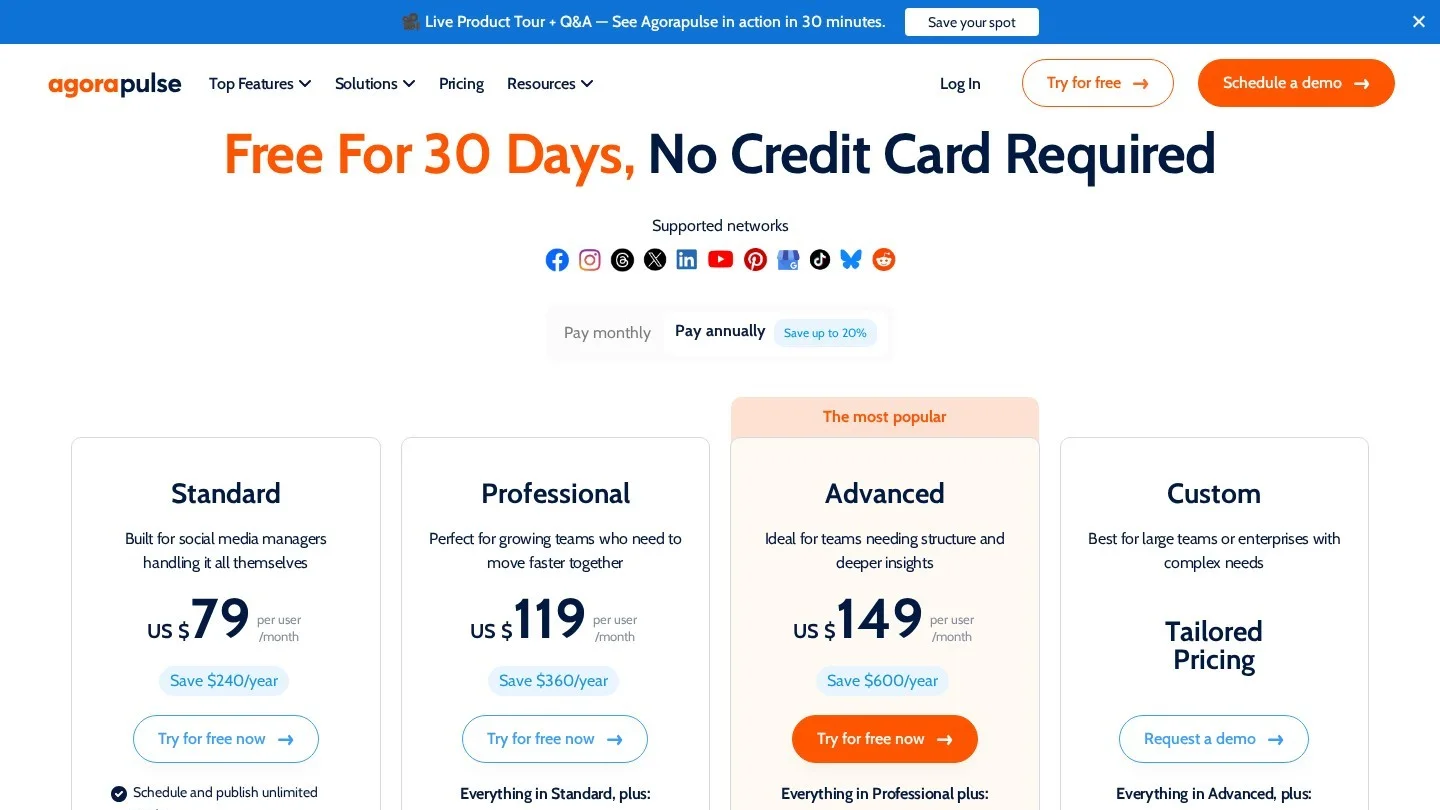
Agorapulse is built around its inbox, where comments, direct messages and reviews land in one feed that your team clears like email. That design suits a dental office well, because the real risk on social media is a patient question that sits unanswered for three days. According to the Agorapulse pricing page, Google reviews moderation and the all-in-one social inbox come with every plan.
Pricing: Standard costs $99 per user a month, or $79 on annual billing, with 10 social profiles, while Professional costs $149, or $119 annually, and adds simple approval workflows and post assignments. Advanced costs $199, or $149 annually, and adds saved replies, bulk actions and ROI reports. Custom pricing covers unlimited profiles and multi-step approvals, and there is a 30-day free trial with no card, and you can stay on a free plan afterward.
Pros: Review replies live next to social replies, so nothing slips. Saved replies on Advanced help your team answer common questions, such as “Do you take my insurance?”, in the same safe way every time. Cons: Approvals start on Professional, and per-user pricing climbs fast if four staff members need logins.
Best for: Single practices and small groups where one or two people own both social posts and review replies.
2. Sprout Social: Best Reporting for DSOs and Large Groups
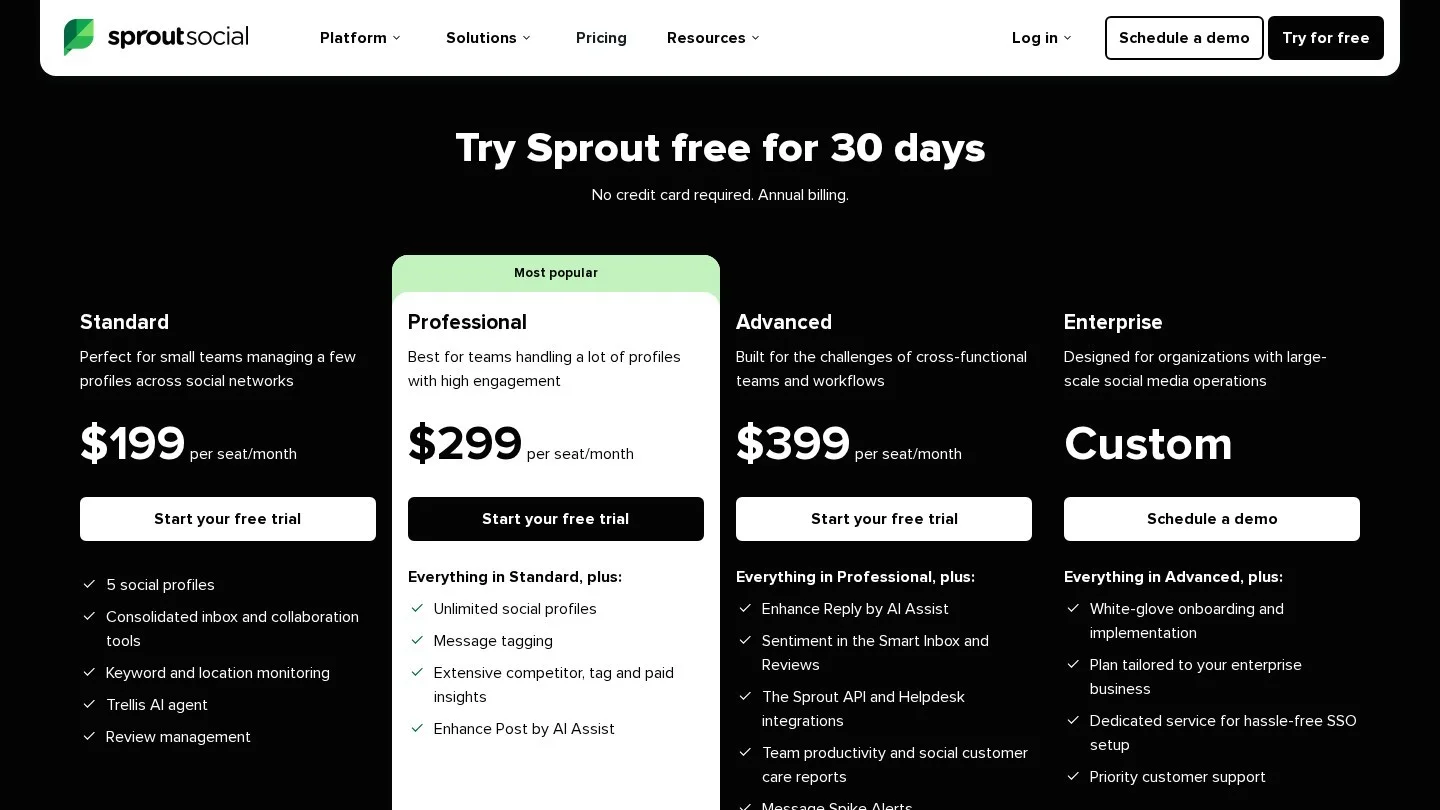
Sprout Social is the tool many corporate marketing teams already know. Its Smart Inbox, reporting and listening tools are polished, and they scale well across many brands and regional teams. For a dental support organization, that means one place to see how every office’s pages perform and which posts drive messages.
Pricing: The Sprout Social pricing page lists Essentials at $79 per seat a month on annual billing, or $99 billed monthly, for up to five profiles. Standard costs $199 per seat and adds the shared inbox and review management. Professional, at $299, adds unlimited profiles and competitor reports, while Advanced, at $399, adds sentiment in the inbox and reviews, plus helpdesk links. Enterprise is quoted on request, and there is a 30-day free trial with no card.
Pros: Strong reports that a regional manager can share upward without editing, with review management built in from Standard. Cons: It is the most expensive tool on this list per seat, and the Essentials plan does not include the shared inbox, which is the feature most practices need first.
Best for: DSOs and groups with a central marketing team, especially ones that already run multi-location dental SEO and want social reporting to match.
3. Birdeye: Best for Pairing Social Posts With Reviews and Practice Software
Birdeye is a reputation platform first and a social tool second, and that order is exactly what makes it useful for dentists. Its dental page says it connects with Dentrix, Eaglesoft, Open Dental, Curve Dental, Dentrix Ascend and other systems. A visit in your practice software can then trigger a review request by text or email, while its Social AI drafts posts, and you can manage social pages for many locations from one dashboard.
On privacy, the same page states: “Our products are fully HIPAA compliant.” Treat that as the vendor’s claim, and before you connect patient data, ask Birdeye for a business associate agreement and read what it covers.
Pricing: Birdeye does not publish fixed prices. Its own guide to Birdeye costs says pricing depends on the products you choose and your number of locations, and that it typically uses annual agreements.
Pros: Review requests tied to real appointments, plus social posting and messaging in one vendor. Cons: No public pricing, annual contracts, and a social module that is lighter than the specialist schedulers.
Best for: Practices whose biggest growth lever is more Google reviews. Our roundup of dental Google reviews statistics explains why that lever matters so much.
4. Metricool: Best Value With a Real Free Plan
Metricool combines a content calendar, analytics and competitor tracking at a low price, and it counts by “brand,” so each office can be one brand with its own set of profiles. Google Business Profile is in its list of supported platforms, which lets you post office updates there from the same calendar.
Pricing: Metricool’s plan comparison lists a Free plan for one brand with up to 20 scheduled posts a month. Starter begins at $20 a month on annual billing, or $25 monthly, for up to five brands, and Advanced begins at $53 a month annually, or $67 monthly, for up to 15 brands. Advanced adds team and client roles, a post approval system and a Looker Studio connector. Prices exclude VAT.
Pros: Cheap, honest pricing and useful analytics history on paid plans. Cons: Approvals only arrive on Advanced, and X (formerly Twitter) is a paid add-on on Starter.
Best for: Solo practices and small groups that want analytics without a big bill.
5. Buffer: Simplest Scheduler, Priced Per Channel
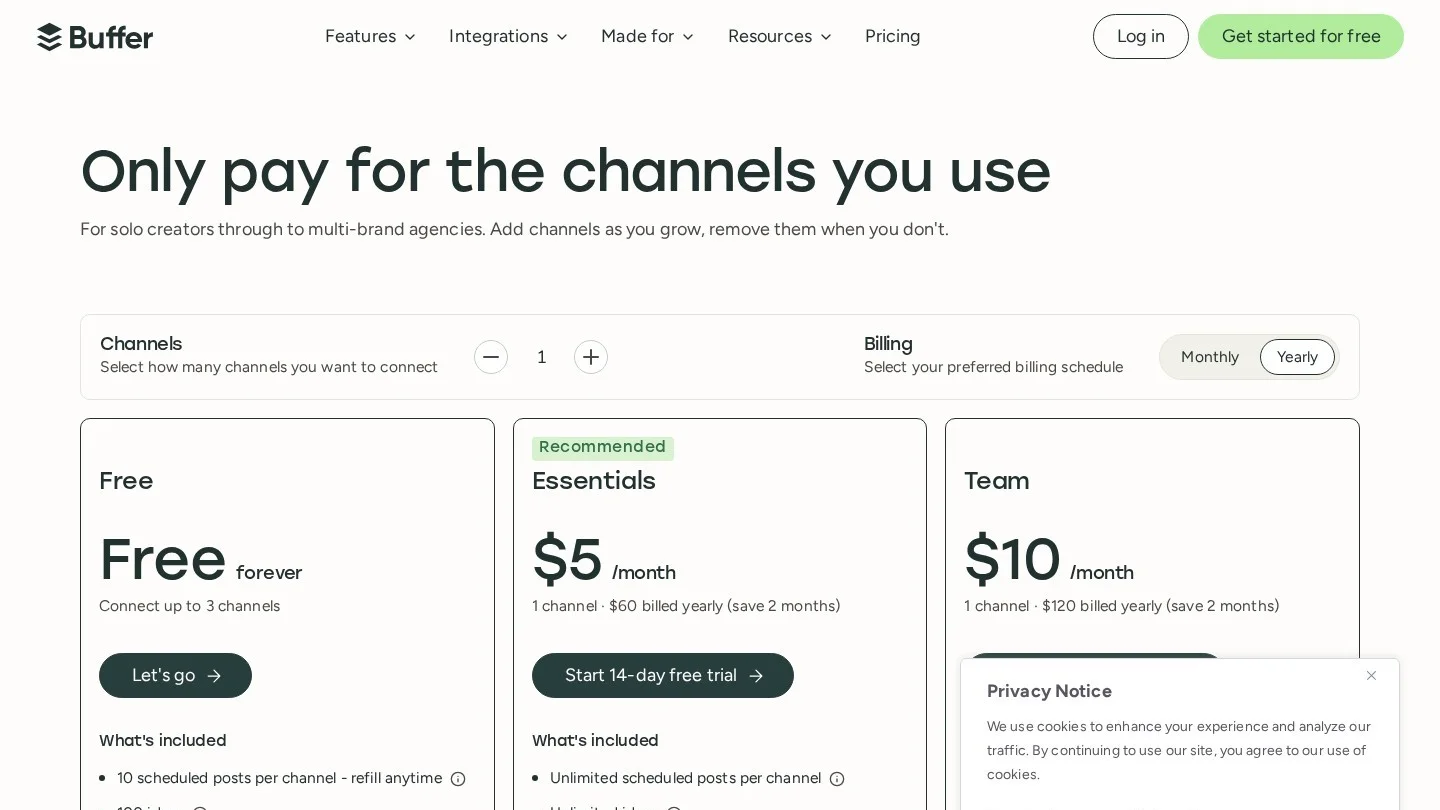
Buffer is the tool to hand a new team member on day one, because it does scheduling and basic analytics well and keeps the screen clean. It supports Google Business, Instagram, Facebook, LinkedIn, TikTok, YouTube Shorts and more. Because you pay per channel, a practice with three channels pays far less than one with twelve.
Pricing: According to Buffer’s own Buffer vs. Hootsuite comparison, the Free plan covers up to three channels with 10 queued posts each. Essentials costs $5 per channel a month on annual billing, or $6 monthly, while Team costs $10 per channel a month annually, or $12 monthly, with unlimited team members. Buffer also offers an “Approval required” access level, so a staff member’s posts wait for a manager.
Pros: Very easy to learn and fair pricing for small setups. Cons: There is no review management, and the per-channel price adds up for multi-location groups.
Best for: A single office posting to three or four channels.
6. Canva: Best for Making the Posts Themselves
Canva is a design tool, not a full social suite, but almost every practice uses it. You can build a branded template once for “Meet the Team Monday” or “Tip Tuesday,” then swap the photo and text each week. The Canva Pro page lists Brand Kit, branded templates and Magic Resize. It also lists a Content Planner that lets you “schedule social posts ahead of time.”
Pricing: The Canva Pro page lists Pro at $119.99 when paid annually, and offers a free Pro trial that needs a card. Canva also has a free plan with fewer templates and features.
Pros: It keeps every post on brand, and Magic Resize turns one design into a story, a feed post and a profile update. Cons: It has no inbox, no reviews and no approval flow built for clinical sign-off.
Best for: Every practice, paired with one of the schedulers above.

7. Hootsuite: Best for Teams That Need Routing and Enterprise Controls
Hootsuite is one of the oldest tools in this category, and its higher plans add inbox routing, team content review and ROI reporting. For a large dental group with a central call center, auto-routing a message to the right office is useful, but for a single practice most of that power goes unused.
Pricing: The Hootsuite plans page says Standard starts at $99 per user a month with 10 social accounts and one inbox. Professional starts at $199 with unlimited accounts and automated replies, and Advanced ranges up to $399 and adds team content review, plus assignment and auto-routing in the inbox. Enterprise is priced on request, and paid plans come with a 14-day trial, though trial accounts have daily posting limits.
Pros: Mature routing and reporting for large teams. Cons: Approvals sit on Advanced, so you pay top-tier prices for the one workflow a dental office needs most.
Best for: Large DSOs with a central social team.
8. SocialPilot: Best Budget Pick for Agencies and Growing Groups
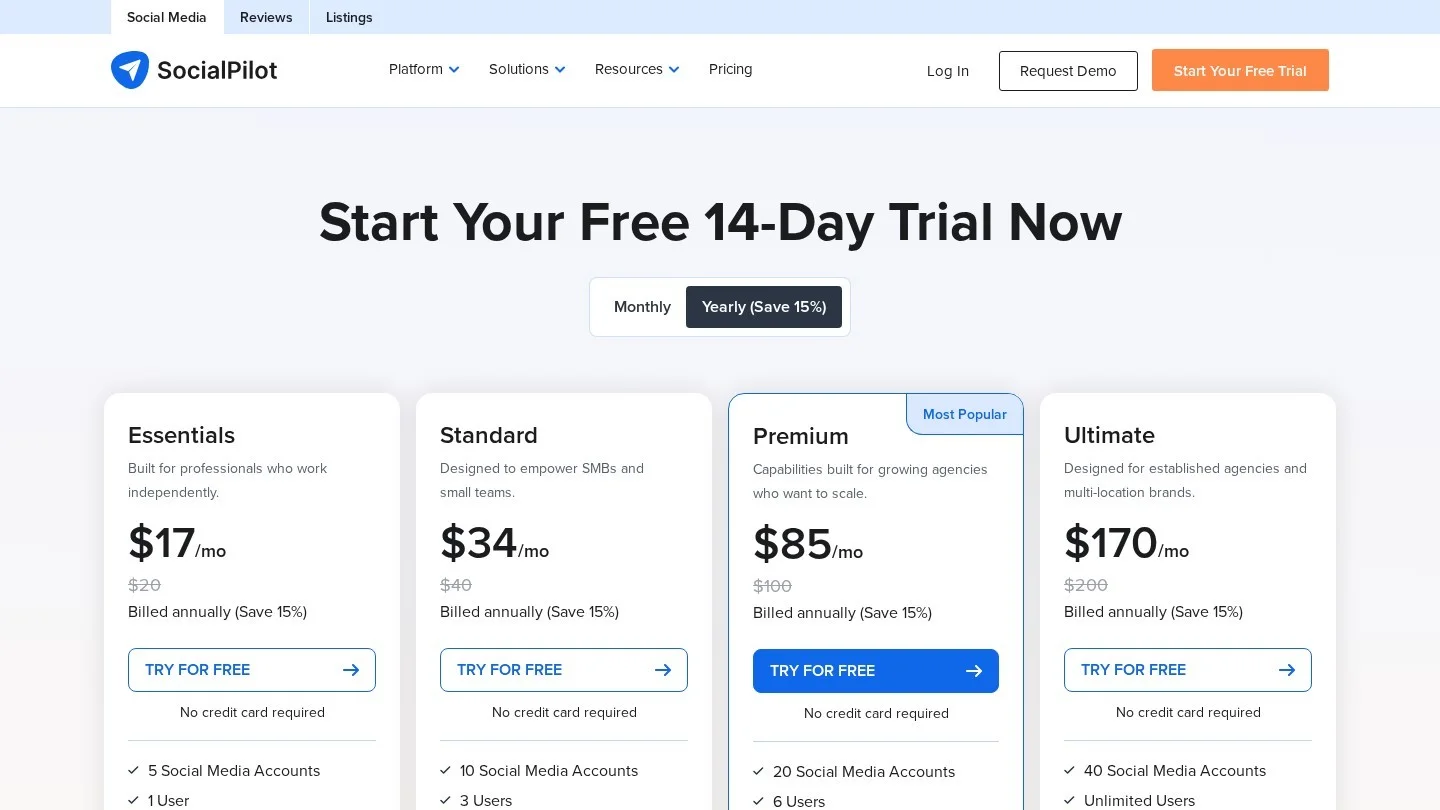
SocialPilot charges a flat price per plan rather than per user. That makes it popular with dental marketing agencies and with groups that have several part-time posters. Google Business is on its supported platform list, and client approval is built into the Premium and Ultimate plans.
Pricing: The SocialPilot pricing page lists Essentials at $20 a month, or $17 billed yearly, for five accounts and one user, while Standard costs $40, or $34 yearly, for 10 accounts and three users. Premium costs $100, or $85 yearly, for 20 accounts, six users and client approval, and Ultimate costs $200, or $170 yearly, for 40 accounts and unlimited users. The free trial lasts 14 days with no card.
Pros: Flat pricing that suits many users. Cons: Approvals start at Premium, and reviews are sold as a separate product.
Best for: Agencies serving several dental clients and groups with many hands on the calendar.
9. Loomly: Best Low-Cost Approval Workflow

Loomly was built around the review-and-approve process, and that is its main appeal for dentists. A coordinator drafts a post, the dentist gets a notice, and the post cannot publish until someone with the right role approves it. Loomly also offers post ideas, which help on weeks when nobody knows what to share.
Pricing: The Loomly pricing page lists Starter at $65 a month, or $49 a month billed yearly ($588 a year). It covers 12 social accounts, three users, approval workflows and advanced analytics. Beyond costs $332 a month, or $249 billed yearly, for 60 accounts and unlimited users. Enterprise pricing is custom, and the free trial needs no card.
Pros: Approvals on the entry plan, which is rare. Cons: There is a big price jump from Starter to Beyond, and no review management.
Best for: Practices where the dentist insists on signing off on every post.
10. Later: Best for Instagram-Led Cosmetic and Ortho Practices
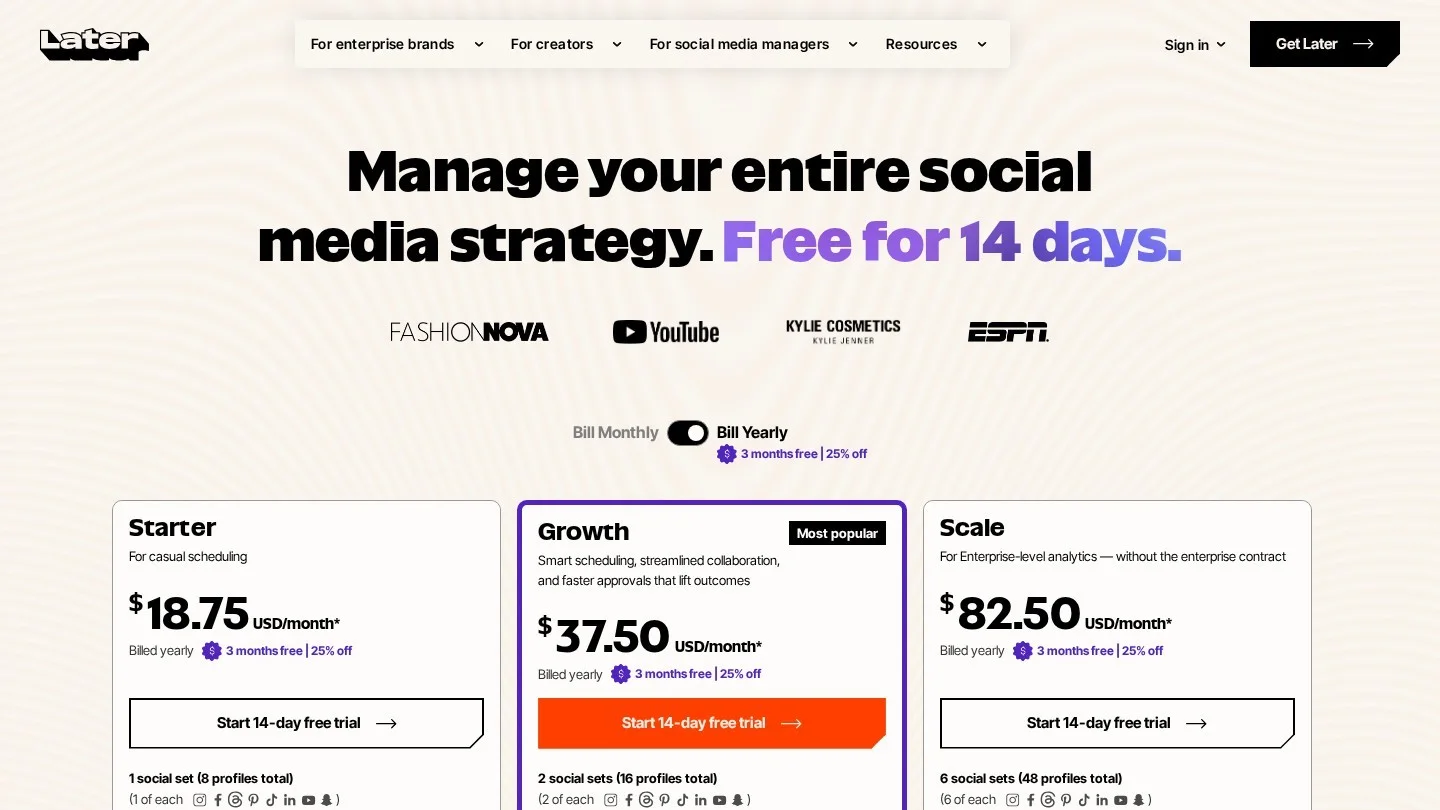
Later grew up as an Instagram planner, and its visual grid preview and link in bio page still suit practices that sell smile makeovers, Invisalign and whitening on Instagram. If your Instagram grid is your shop window, Later helps you plan how it looks before anything goes live.
Pricing: The Later pricing page lists Starter at $18.75 a month billed yearly. That buys one social set of eight profiles, one user and 30 posts per profile a month, while Growth costs $37.50 a month billed yearly for two social sets, two users and 180 posts per profile. It also adds internal and external approvals. Scale costs $82.50 a month billed yearly for six social sets and four users. Every plan has a 14-day free trial.
Pros: Strong visual planning and link in bio on every plan. Cons: Starter has no approvals and caps posting at 30 posts per profile a month.
Best for: Cosmetic and orthodontic practices that win patients on Instagram. Pair it with our list of Twitter bios for dentists if you also want your X profile to match.
Side-by-Side Comparison of Prices, Approvals and Reviews
The table lists the entry price for each tool and how it covers the three dental-specific needs. A dash means the feature is not part of that vendor’s plan comparison.
| Tool | Entry paid price | Free plan or trial | Approvals from | Review handling | Best for |
|---|---|---|---|---|---|
| Agorapulse | $79/user/mo annual | 30-day trial, then free plan | Professional | Google reviews on all plans | Single practices, small groups |
| Sprout Social | $79/seat/mo annual | 30-day trial | – | Standard and up | DSOs |
| Birdeye | Custom quote | – | – | Core product | Review-led growth |
| Metricool | $20/mo annual | Free plan | Advanced | – | Budget analytics |
| Buffer | $5/channel/mo annual | Free plan | “Approval required” access | – | Small single offices |
| Canva | $119.99/yr (Pro) | Free plan, Pro trial | – | None | Designing posts |
| Hootsuite | From $99/user/mo | 14-day trial | Advanced | – | Large DSOs |
| SocialPilot | $17/mo yearly | 14-day trial | Premium | Separate product | Agencies |
| Loomly | $49/mo yearly | Free trial | Starter | – | Dentist sign-off |
| Later | $18.75/mo yearly | 14-day trial | Growth | – | Instagram-led practices |
Worked Example: Pricing a Three-Office Practice With Approvals
Price pages are hard to compare because each vendor counts something different: some count users, some count channels and some count “brands” or “social sets.” So we priced one realistic setup, which is an illustration with stated assumptions rather than a quote.
The practice: three offices, each with Facebook, Instagram, Google Business Profile and LinkedIn. That makes 12 profiles. Two people need logins: the marketing coordinator who drafts posts and the lead dentist who approves them. Approvals are required, and every price uses annual billing.
| Tool and plan | Why this plan | Math | Annual cost |
|---|---|---|---|
| Later Growth | 2 social sets = 16 profiles, 2 users, approvals | $37.50 × 12 | $450 |
| Loomly Starter | 12 accounts, 3 users, approvals | $49 × 12 | $588 |
| Metricool Advanced | Up to 15 brands, approvals | $53 × 12 | $636 |
| SocialPilot Premium | 20 accounts, 6 users, client approval | $85 × 12 | $1,020 |
| Buffer Team | Per channel, unlimited members | 12 × $10 × 12 | $1,440 |
The spread is more than three to one for the same job, and Later wins on price here because two social sets cover all 12 profiles. Buffer costs the most because it charges for every channel, even though it is the cheapest tool for a single office with three channels. Run the same math with your own channel count before you pick.
Now add the cost that matters more, which is staff time. Say your coordinator earns $25 an hour and posting by hand takes three hours a week. A scheduler that cuts that to one hour saves about $2,600 a year (2 hours × 52 weeks × $25). That time saving alone covers any plan in the table.
Privacy Rules Every Tool Must Fit Inside
Software can make a privacy mistake faster, but it cannot cause one on its own, because the risk comes from what your team posts and how they reply. US practices should build their social media process around three rules.
Get written authorization before featuring a patient. The HHS guidance on marketing under HIPAA says the Privacy Rule requires “an individual’s written authorization” before protected health information is used or disclosed for marketing, with limited exceptions. A before-and-after photo, a tagged smile or a “happy patient” story all count. Keep the signed form on file and reference it in the calendar notes for that post, so anyone can check consent before reposting.
Never confirm someone is a patient in a reply. HHS settled with New Vision Dental in California after what it called “inappropriate use of social media to respond to patient reviews.” According to the HHS enforcement summary, the practice paid $23,000 and agreed to a corrective action plan. A safe reply thanks the reviewer and invites them to call the office, without naming a visit, a treatment or a date.
Read the vendor’s privacy promise closely. A tool that says it is HIPAA compliant may sign a business associate agreement, but that only covers data inside the tool. It does nothing about a photo your hygienist posts to Instagram. Use saved replies, approval steps and named user roles to make the safe choice the easy one.
If you use AI writing features inside these tools, keep patient details out of the prompt. Our guide to growing a dental practice with ChatGPT covers safe prompting habits that apply to any AI writer.
How to Choose Your Tool in Four Questions

Most practices can narrow ten tools to one by answering four questions in order, since each answer removes a few options.
- Who replies to reviews today? If the same person handles social and reviews, pick a tool with both, such as Agorapulse, Sprout Social or Birdeye. If reviews already live in your practice software, a pure scheduler is enough.
- Must a dentist approve posts? If yes, Loomly gives you approvals at the lowest tier. Later Growth, Metricool Advanced and SocialPilot Premium are the next cheapest routes.
- How many channels and users will you have in a year? Per-channel and per-user pricing punish growth. Flat plans, such as SocialPilot and Loomly, are safer for groups that plan to add offices.
- Who makes the creative? If nobody on staff designs, add Canva to whatever you choose. A scheduler full of plain text posts will not hold attention.
Social media also feeds your local search work. Posts on your Google Business Profile keep the listing fresh, and our guide to ranking a dental practice on Google Maps shows where updates fit among other profile signals. For the search side, our review of the best SEO tools for dentists covers rank tracking and listings tools that pair well with a scheduler.
A Weekly Posting Rhythm That Fits a Busy Front Desk
A tool only helps if someone sits down to use it, and a simple rhythm keeps the calendar full without eating into patient time. Plan on a Monday, approve on a Wednesday and check the inbox every morning.
On Monday, the coordinator drafts the next week of posts in one batch. Aim for a mix: one team or culture post, one patient education tip, one review thank-you (with the reviewer’s consent if you name them) and one office update for Google Business Profile. On Wednesday, the dentist approves or edits any post that mentions a treatment, a price or a result, and each morning someone clears the inbox before the first patient arrives.
Once a month, look at the report to see which posts drove messages or calls and which ones got no reaction. Cut what failed and repeat what worked. Social media is also one way to earn links and mentions, and our list of dental guest posting sites shows how to turn your best posts into longer articles for other sites.
What Dental Teams Ask Before Choosing a Social Media Tool
What Is the Best Social Media Management Tool for Dentists?
Agorapulse is the best all-round pick for most practices because it handles posting, the inbox and Google reviews in one place. Sprout Social suits large groups that need reports, and Birdeye suits practices focused on reviews.
Is There a Free Social Media Tool for Dental Practices?
Yes. Buffer’s free plan covers three channels with 10 queued posts each, and Metricool’s free plan covers one brand with 20 scheduled posts a month. Agorapulse also lets you stay on a free plan after its trial.
Are Social Media Scheduling Tools HIPAA Compliant?
Some vendors say so. Birdeye, for example, states its products are fully HIPAA compliant. Ask any vendor for a business associate agreement, and remember that compliance also depends on what your team posts and how it replies.
Can I Post Patient Photos on Social Media?
Only with the patient’s written authorization. HHS guidance says marketing uses of protected health information generally need it, and a patient photo or story counts.
How Often Should a Dental Practice Post on Social Media?
Pick a pace your team can keep for a full year. Three to four planned posts a week, plus daily inbox checks, is a workable rhythm for most single offices.
Should I Hire an Agency Instead of Buying a Tool?
If nobody in the practice has a few hours a week, an agency may cost less than the lost time. Compare providers in our list of top dental marketing services and ask whether they use one of the tools above.
Start With One Tool and One Month of Posts
Pick the tool that matches your answer to the first two questions above, and start a free trial. Load four weeks of posts, invite the dentist as an approver and connect your Google Business Profile. At the end of the trial, check whether your inbox response time got faster and whether the calendar stayed full.
If both are true, the tool is earning its fee. If not, the problem is usually the process rather than the software, so fix the weekly rhythm before you switch tools.