
Third in the map pack on Monday, gone on Tuesday. When a dental office sees that, the first check for any dentist local pack ranking fluctuation is where the search was made. The drop may not be real at all. Google measures distance from the person searching, so a patient two miles away can see three different dentists than your front desk sees.
We built a ten-step diagnosis from Google’s help pages on local ranking, profile edits, Google updates and suspensions, plus its Search Status Dashboard. Three geo-grid trackers are priced from their own sites. If you still need to get into the pack, our guide on ranking a dental clinic in the local 3-pack covers the profile setup.
Request Dental SEO Quote
Keep These Map Pack Facts Close
- Google ranks local results on relevance, distance and prominence. It also says there is no way to pay for a better local ranking.
- Distance is measured from the searcher, so one search from your own office tells you very little.
- Google gives owners 4 days to act on a suggested edit. After that, it may publish the change on its own.
- Google logged two core updates and four spam updates between March and September 2026.
- In our math, a 7×7 grid for five keywords, scanned weekly, uses about 1,062 Local Falcon credits a month.
Rule Out the Searcher’s Location Before Anything Else
Google defines distance as how far each business is from the customer who is searching. If that customer has not shared a location, Google uses what it knows about where they are. So the pack can change from one block to the next.
That is why a check from the front desk misleads. The office computer sits at your address, so the practice usually looks fine from there. However, a parent who types “pediatric dentist” in a school parking lot across town is a different searcher. For that parent, three other offices may be closer.
The words matter too. “Dentist near me,” “emergency dentist” and “dental implants” can each return a different pack, because Google judges relevance search by search. So before you call it a drop, write down two things. First, note where the search happened. Second, note the exact words typed.

Measure Each Swing Against Google’s Three Ranking Factors
Google ranks local results on three factors: relevance, distance and prominence. Relevance is how well a Business Profile matches what someone is searching for. Prominence is how well known a business is. It depends partly on how many websites link to the business and how many reviews it has.
No one can request or pay for a better local ranking, Google says. So if a sales rep promises you a fixed spot in the map pack, they are promising something nobody can buy. Google adds that verified profiles with complete and accurate details are more likely to show up.

We sorted the usual causes of a swing by factor. A sudden move points to a change someone made. A slow slide points to a gap that built up over months.
| Factor | Google’s meaning | Causes of a sudden move | Causes of a slow slide |
|---|---|---|---|
| Relevance | How well the profile matches the search | A category or service edit, or a Google update nobody reviewed | Missing services, hours or attributes |
| Distance | How far the office is from the searcher | A different searcher location, or a move to a new address | A new office opening closer to your patients |
| Prominence | How well known the business is | A suspension, or a rival’s burst of new reviews | Review counts that lag the offices around you |
Line Up Your Drop Dates With Google’s Update Log
Google posts its Search ranking updates on the Search Status Dashboard. Each entry carries a start date and the length of the rollout. These were the 2026 search ranking updates in that log.
| Update | Start date | Rollout length |
|---|---|---|
| March 2026 spam update | March 24, 2026 | 19 hours, 30 minutes |
| March 2026 core update | March 27, 2026 | 12 days, 4 hours |
| May 2026 core update | May 21, 2026 | 11 days, 21 hours |
| June 2026 spam update | June 24, 2026 | 2 days, 1 hour |
| August 2026 spam update | August 18, 2026 | 2 days, 16 hours |
| September 2026 spam update | September 24, 2026 | 13 days, 16 hours |
Keep in mind that the dashboard covers Google Search ranking as a whole. Map results do not appear there as a separate item. So treat a matching date as a lead to follow up. For example, if your website lost organic clicks in the same window, look at the site first.

Also, give an update time to finish. The September spam update ran for more than 13 days. A rank you record on day two may not be where you land. Our post on why dental SEO takes time explains why steady work beats reacting to each swing.
Catch Profile Edits Nobody on Your Team Made
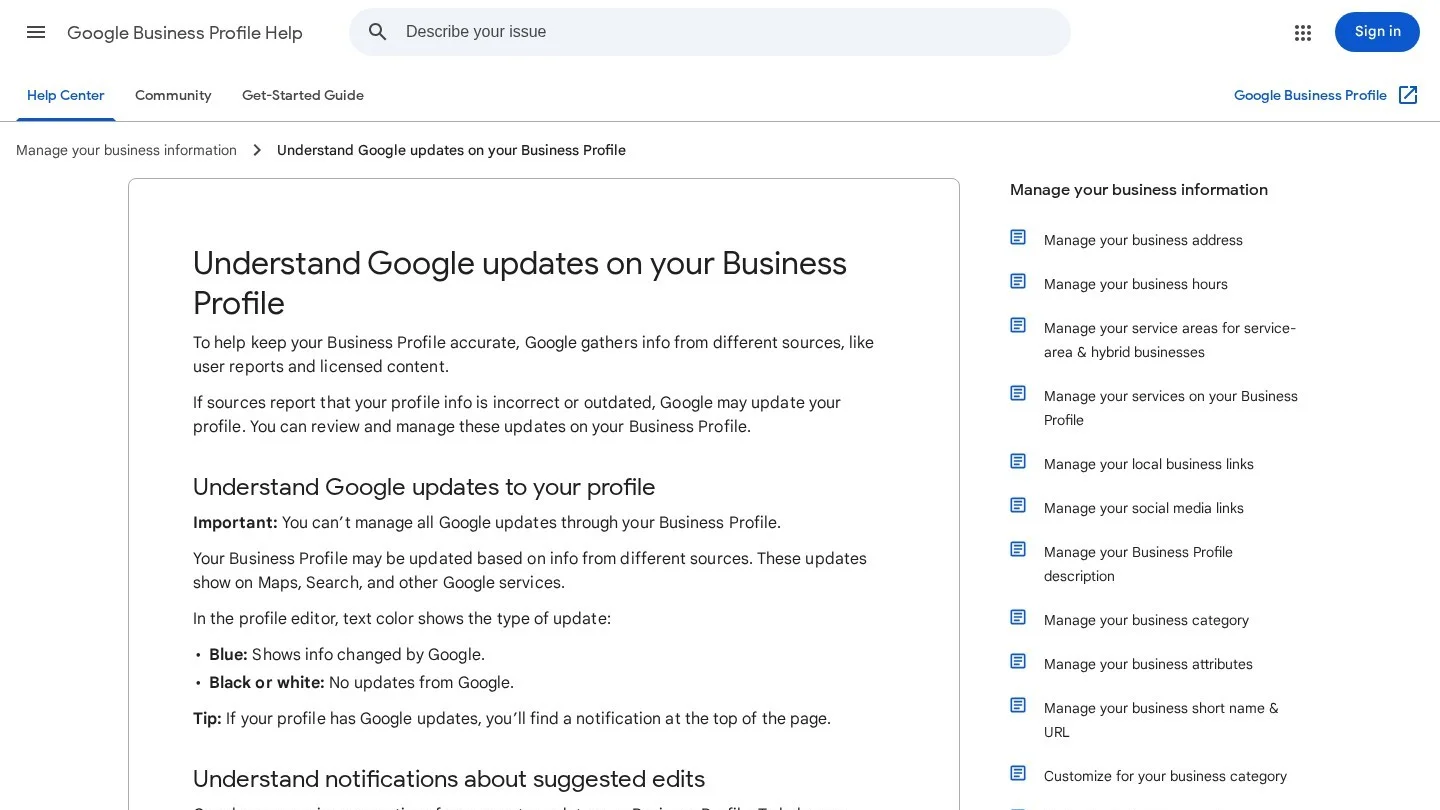
Your profile can change without anyone on your team touching it. Google pulls profile information from several sources, including user reports and licensed content. Members of the public can also suggest edits to any profile.
Answer Suggested Edits Inside the Four-Day Window
When a suggested edit needs your review, Google may send an email or show a notice in the profile. You then have 4 days to accept or reject it. If you do nothing, Google may publish the update, but only when other public information, such as your website, supports it.
In the profile editor, blue text marks details that Google changed. So a wrong category or new Saturday hours can go live while nobody is looking. That is why we suggest one named person opens the profile every Monday and Thursday. Two checks a week means no 4-day window slips past.
Allow Review Time After Your Own Changes
Your own edits go through review too. Most take up to 10 minutes to review, but some take up to 30 days. A pending edit is marked as under review. Also, Google may not approve a change if it cannot confirm it is accurate.
Some edits bring a second step. If you change the business name after verification, you might need to verify again. If you move to a new address, you must verify again. So plan a rebrand or a move for a quiet month, and keep your proof of address ready.
Groups have one more rule. All locations of a business must share a primary category, in Google’s words. If one office moves while the others hold, check that its category still matches the group. Our guide to multi-location dental SEO covers the rest of the group setup.
Confirm the Profile Is Still Live
A drop from second to fifth is one problem. Vanishing from every search is another. Google may suspend or disable profiles that do not follow its guidelines, and when a profile is removed, the public can’t go to it.
To appeal, sign in to the account that owns the profile and open Google’s appeals tool. Then pick the profile and the decision you want to appeal. After that, attach evidence. Accepted examples include business registration, a business license, tax certificates and utility bills. The name and address on each document should match the profile.
Get the file right the first time, because Google says appeals can only be submitted once. Also, do not create a new profile for the same practice. For 10 or more suspended locations, Google asks for one bulk request with a spreadsheet of profile IDs and supporting documents.
Next, review the profile against Google’s guidelines before you appeal. For instance, the name should reflect the practice’s real-world name. Marketing taglines, service details and location details are all banned from the name field. In addition, a virtual office is not eligible for a profile, and a co-working office needs clear signage.
Compare Your Review Count With the Offices Above You
More reviews and positive ratings work in a business’s favor for local ranking, Google says. Replying to reviews shows you value feedback. But prominence is relative. Your count can hold steady while you slip, because the office next door kept asking every patient.
Once a month, log four numbers for each office in the pack for your main keyword. Note the review count, the rating, the new reviews since last month and whether the owner replies. After three months, you will see who is gaining pace. Our dental Google review statistics show how much patients rely on those reviews.
Then fix your own pace. Send a review link after every visit, to every patient. Our playbook to get more five-star dental reviews covers the request scripts. For automated requests, we compared dental review management software as well.
Watch What Competing Offices Change on Their Profiles
A rival’s edit moves you as much as your own. For example, a new office may open closer to your patients. Another practice may add “Emergency dental service” as a category. Or a competitor may stuff keywords into its business name, which Google’s guidelines forbid.
Report a Keyword-Stuffed Name Through the Right Channel
For fraud, there is the Business Redressal Complaint Form. It covers misleading information or fraud tied to a business’s name, phone number or URL. However, the form is not meant for simply correcting a wrong name, phone number or URL. For that, suggest an edit on the profile.
If you do file, the form asks for the profile’s Google Maps URL and a detailed explanation that quotes the exact content. Keep your tone factual. Also, expect silence afterward, because Google says it can’t guarantee action and won’t send status updates.
Check Whether a Dentist’s Own Profile Took the Spot
Dentists count as individual practitioners in Google’s guidelines. A dentist in a public-facing role, who can be reached at the verified location during stated hours, may have a dedicated profile. When several practitioners share a location, the practice should hold its own separate profile.
So when your practice drops, look at who replaced it. Sometimes it is one of your own doctors. A practitioner also shouldn’t have several profiles to cover each specialty, so remove any duplicates you find.
Map Rankings Across Your Neighborhood With a Geo-Grid Tracker
A geo-grid tracker runs the same search from a grid of points around your office. Then it records your rank at each point. As a result, you see where you win and where you lose across the whole area.
We compared three trackers using their official pages. Each one takes a different pricing approach.
Buy Scan Credits on Local Falcon
Local Falcon sells monthly credits. One credit is one data point, or “map pin,” on the grid. That means a 5×5 grid uses 25 credits per scan. Grid sizes run from 3×3 up to 21×21.
The Starter plan costs $24.99 a month for 7,500 credits. Basic costs $49.99 for 15,150 credits, and Pro costs $99.99 for 31,250. Premium costs $199.99 for 63,150 credits. New accounts get 100 free credits, with no credit card needed.

Use the Grid Included in BrightLocal Plans
BrightLocal includes its Local Search Grid in all three plans. For one location, Track costs $41 a month, or $31 a month billed annually. Manage costs $54, or $40 annually, and Grow costs $65, or $49 annually.
On the Track plan, the grid covers up to five keywords. For two to five locations, Track rises to $62 a month. So a practice with two offices pays by location band.
Schedule Repeat Grids in Local Viking
Local Viking plots 3-pack rankings across GPS points, and you set the spacing between them. You can click any point to see which competitors rank there. Then the tool rescans your grids at set intervals that you schedule per location and keyword.
It offers two methods. The Places API GeoGrid runs on your own Google Places API key, and it cannot track service area businesses. The SAB GeoGrid tracks businesses with or without a listed address. Also, grids export to CSV, and you can export timelapse GIFs that show change over time.

| Tracker | How you pay | Grid detail |
|---|---|---|
| Local Falcon | Monthly credits, one per grid point, from $24.99 a month | 3×3 to 21×21 grids |
| BrightLocal | Plan per location band, from $41 a month or $31 billed annually | Up to five keywords on Track |
| Local Viking | The Places API method runs on your own Google key | Spacing you set, scans on a schedule |
Size the Grid to How Far Your Patients Travel
Pull your patients’ ZIP codes from your practice management software first. Then set the grid spacing so the outer points land where most patients live. A grid that reaches past your patient area wastes credits on searches nobody makes.
Next, count the cost. We ran the math for five tracked keywords, with credits charged one per point. A month here is 52 weeks divided by 12.
| Grid | Points per scan | Weekly scans, 5 keywords | Daily scans, 5 keywords |
|---|---|---|---|
| 5×5 | 25 | 542 credits a month | 3,750 credits a month |
| 7×7 | 49 | 1,062 credits a month | 7,350 credits a month |
| 9×9 | 81 | 1,755 credits a month | 12,150 credits a month |
| 13×13 | 169 | 3,662 credits a month | 25,350 credits a month |
So a single office scanning a 7×7 grid weekly for five keywords fits well inside Local Falcon’s 7,500-credit Starter plan. Even daily 7×7 scans come in just under that limit. In our view, weekly scans give most practices enough to act on. Daily scans cost more and rarely change what you do next.
Also, keep the conditions fixed. Run each scan on the same day of the week, with the same keywords and the same center point. Otherwise, you end up comparing two different tests.
Work Through the Ten-Step Diagnosis in Order
Run this list the day a drop shows up. The order matters, because the early steps are free and fast. Only touch the profile after step nine.
- Scan before you change anything. Run one grid for the keyword that dropped, so you have a record of the problem.
- Find the shape of the drop. Check whether you lost the whole grid or only one side of town.
- Look for blue text in the editor. Blue marks details Google changed, and a notice appears at the top when updates are waiting.
- Check your edit status. Look for edits that are pending or not approved.
- Confirm the profile is public. Search the practice name in Google Maps and check the owner’s inbox for a suspension email.
- Compare dates with the dashboard. See if the drop started inside a Search ranking update.
- Count your rivals’ reviews. Note who gained the most since last month.
- Spot new names and new offices. Check the pack for new profiles, renamed profiles and new categories.
- Look for your own doctors. See whether a practitioner profile took the practice’s spot.
- Scan again a week later. Act only if the second grid shows the same loss.
If both grids show the same loss and steps three to nine found nothing, look next at your website and your directory entries. Our dental citation management software roundup covers tools that keep your address the same across directories.

Clear Up the Doubts Owners Raise About Map Pack Swings
Why Do We Rank First at the Office and Fifth at Home?
Distance is measured from the person searching. At the office, you are the closest dentist. At home, other offices may be closer, so the pack changes.
Can We Pay Google for a Fixed Top-Three Spot?
No. Google states there is no way to request or pay for a better local ranking. So any offer of a guaranteed map spot is a red flag.
How Long Should We Wait Before Reacting to a Drop?
We suggest two scans a week apart. Also, if you made an edit, remember that Google’s review of it can take up to 30 days.
Will Renaming Our Practice Affect the Profile?
A name change after verification might mean you have to verify again. Use the new name on your signage first, then update the profile.
Should Every Dentist in Our Practice Have a Profile?
Yes, for dentists in public-facing roles who can be reached at the location during stated hours. However, the practice still needs its own separate profile, and each dentist should have only one.
Record a Baseline Grid This Week
Pick your five most valuable keywords today, such as “dentist,” “emergency dentist” and “dental implants” plus your city. Then run one 7×7 grid for each and save the results. After that, put the Monday and Thursday profile check on someone’s calendar.
With a baseline in hand, the next swing becomes a question you can answer in an hour. If you would rather hand the tracking to a specialist, compare dental marketing firms on Dental SEO Agencies.